
Elemental Trust Centre
Learn how Elemental protects your data in compliance with UK GDPR.
Microsoft EntraMicrosoft Teams
 Microsoft Entra
 Microsoft Teams
Elemental is an approved Microsoft Education solution and we are an official Microsoft Education Partner. To get started, Elemental needs access to your school's Microsoft services, like Teams.
Below is more information on Elemental's Microsoft integrations, including what permissions are required and how Elemental protects your data in compliance with UK GDPR.
Accreditations
- Microsoft
- Microsoft Education Partner
- Microsoft Marketplace
- Approved Microsoft Marketplace application
- Cyber Essentials
- Certified



Key Documents
Data Processing Agreement – Microsoft Entra and Microsoft Teams
This is the agreement that applies to your school. Elemental acts as your Data Processor under UK GDPR Article 28 for the data listed below. An executable version, ready for e-signature, is available on request from privacy@elementalmusic.app.
Privacy Policy
To be read alongside the Data Processing Agreement. It covers the data for which Elemental is the Data Controller under UK GDPR Article 24, such as the content and marks Elemental generates.
What we process
For Microsoft Entra and Microsoft Teams for Education integrations, Elemental acts as a Data Processor under UK GDPR Article 28 for the following data from those systems:
- User profiles (student and teacher email addresses, first names and last names)
- Class rosters (class names and identifiers, teacher identifiers and student identifiers)
- Assignments (identifiers and statuses)
Our commitments on where Student Data is stored, how quickly we notify you of a breach, and how deletion and data subject requests are handled are set out in full in the Data Processing Agreement.
Permissions we request
| Scope | Microsoft's Description |
|---|---|
| EduAssignments.ReadWrite | "Read and write users' class assignments and their grades" |
| EduAssignments.ReadWriteBasic | "Read and write users' class assignments without grades" |
| EduRoster.ReadBasic | "Read a limited subset of users' view of the roster" |
| "View users' email address" | |
| offline_access | "Maintain access to data you have given it access to" |
| openid | "Sign you in" |
| profile | "View users' basic profile" |
These scopes and their associated permissions are defined and described by Microsoft and are documented at https://learn.microsoft.com/en-us/graph/permissions-reference.
Setting up
Prerequisites
- Microsoft Entra and Microsoft Teams for Education
- Whitelisting of https://elementalmusic.app, https://*.elementalmusic.app and https://cognito-idp.eu-west-2.amazonaws.com (https://auth.elementalmusic.app and https://media.elementalmusic.app should explicit subdomains be required) in any firewalls or network / device policies
- Whitelisting of *@elementalmusic.app (support@elementalmusic.app should explicit email addresses be required) in any email spam policies
Signing in
Teachers and students sign in at elementalmusic.app/sign-in using the Continue with Microsoft button, after entering their school email address.
Elemental links users to a school account based on their email domain. If your school uses multiple email domains (for example @school.org and @students.school.org), contact us so we can add them to your account. New users are set up with Student permissions and have no access to other students' data. An administrator can grant Teacher or Admin permissions from the Department page.
Authentication happens against your school's own Microsoft Entra tenant, not Elemental's. Teachers and students sign in with their existing school credentials, and their passwords are never shared with or stored by Elemental. Your school also stays in control of who can sign in. If your tenant blocks cross-tenant access, you will need to allow Elemental before anyone can sign in (see Allowing and restricting access below).
Step-by-step guides, with short videos, are available for both signing in and creating an account:
Granting the required permissions
A Microsoft Entra tenant administrator needs to grant Elemental the permissions listed above. They can do this by using the link below to approve these permissions on behalf of their organisation.
https://login.microsoftonline.com/organizations/v2.0/adminconsent?client_id=b4e1c4da-76cd-466d-9e87-52b254a43c97&redirect_uri=https%3A%2F%2Felementalmusic.app%2Fmicrosoft%2Fsetup&scope=email%20offline_access%20openid%20profile%20https%3A%2F%2Fgraph.microsoft.com%2FEduAssignments.ReadWrite%20https%3A%2F%2Fgraph.microsoft.com%2FEduAssignments.ReadWriteBasic%20https%3A%2F%2Fgraph.microsoft.com%2FEduRoster.ReadBasicAlternatively, the first time a teacher opens a page that needs these permissions, such as Classes & Students or Manage Homework, Microsoft shows an administrator consent prompt. An administrator can sign in and tick Consent on behalf of your organisation so that other teachers can use the integration without further administrator involvement.
Checking it worked
Once permissions are granted, confirm that teachers can open the Classes & Students page and that the expected classes are listed. If too many classes appear, you can hide the ones you do not need.
To see the workflow teachers and students follow once connected, from assigning homework through to marks being returned to Microsoft Teams for Education, read our Sharing Homework and Marks with Microsoft Teams help article.
Allowing and restricting access
Elemental adds each teacher and student to its own Microsoft Entra tenant as a guest, using B2B collaboration. Entra allows this by default, but if your tenant's cross-tenant access settings block it, they will not be able to sign in until you allow Elemental. You can also use the same settings to limit access to particular staff or student groups, without changing anything in Elemental.
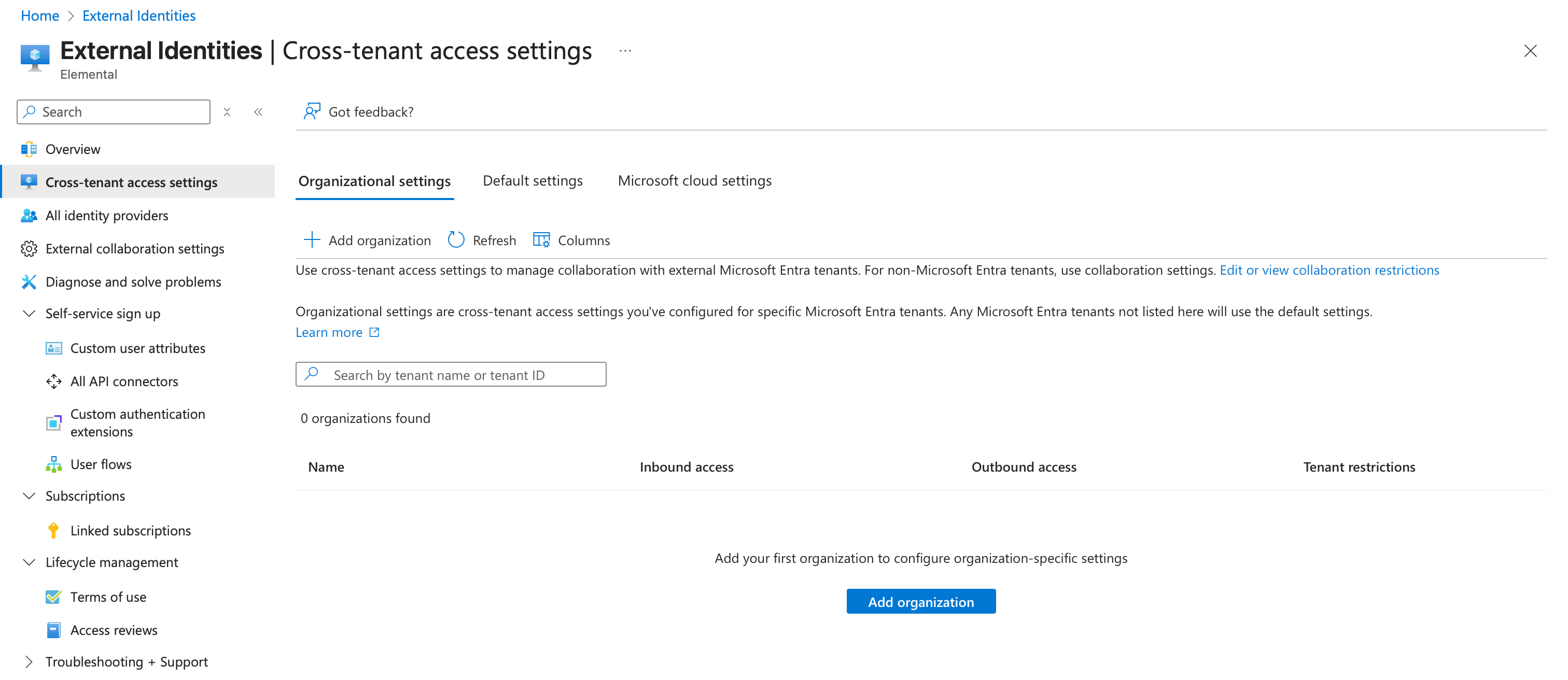
Start from the Cross-tenant access settings page under External Identities in the Azure portal, then:
- On the Organizational settings tab, select Add organization.
- Search for elementalmusic.app, check the tenant ID shown matches the Elemental tenant ID below, then select Add.Elemental tenant ID
90f2dd8c-5ea8-4d9f-9191-43d8122dcfb3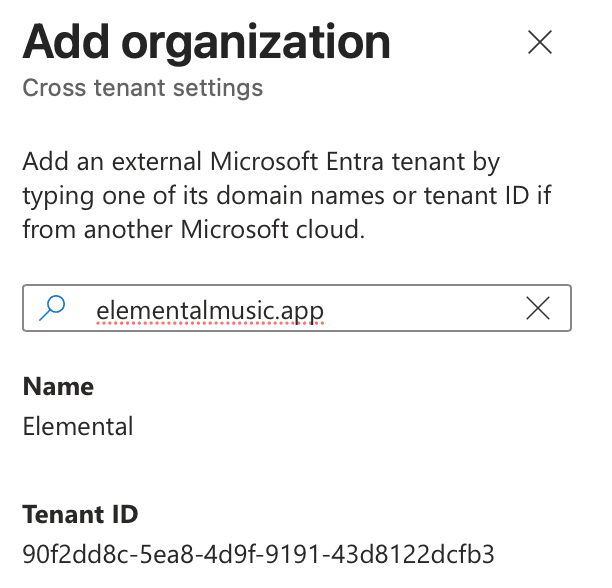
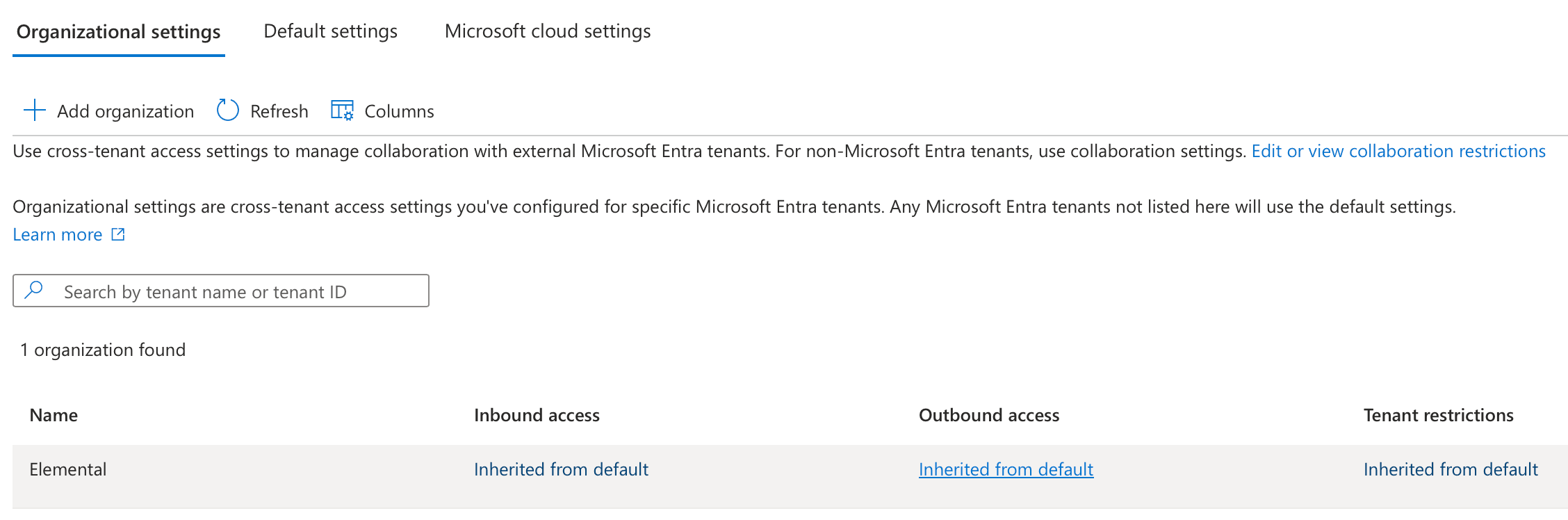
- Elemental now appears in the list of organisations. Select Inherited from default in its Outbound access column.
- On the B2B collaboration tab, choose Customize settings and Allow access. Under Applies to, either choose All <your organisation> users, or, as we recommend, choose Select <your organisation> users and groups to limit access to those who need Elemental (this needs Microsoft Entra ID P1 or P2). If you select users and groups, choose Add <your organisation> users and groups, pick the users and groups, then choose Select. Finally, select Save.
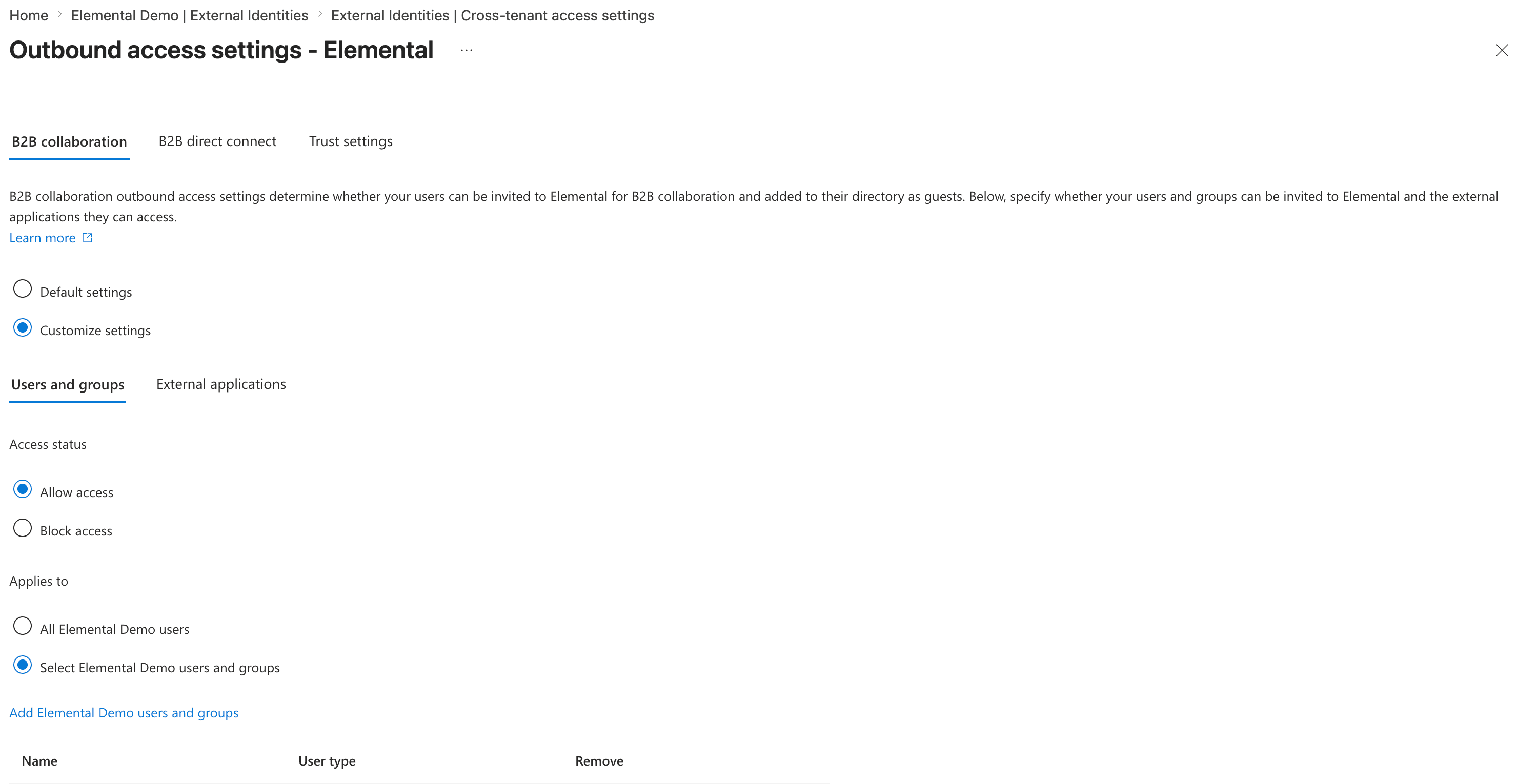
For more detail, see Microsoft's guide to modifying outbound access settings.
Data Protection Impact Assessments (DPIAs)
We are happy to support the completion of a Data Protection Impact Assessment (DPIA), including any security questionnaires. Our DPIA information pack and a blank template are on the Documents page, and you can reach us at privacy@elementalmusic.app.























Ready to get started?
Start your 30-day free trial today. No payment details required.